
Case study · Game
In developmentUntitled open-world project
A coastal city you can drive, walk and fly through, built in Unity and Blender for PC, iPhone and Android. This page shows how the city is being made, and where it stands today.

- City size
- 1.5 × 1.5 km
- Road network
- 33.8 km
- Downtown buildings
- 71
- Automated tests
- 834
Overview
An ambitious city, built step by step
The goal is a realistic open-world city with its own story: a downtown of brick and glass, a freeway, suburbs, hills and a coastline, with streets you can drive and buildings you can enter. It's in active development, and nothing here is a release.
Role
Creative direction, game development, the 3D and art pipeline, and testing, under the Prince Is Genius studio.
Platforms
PC first, with iPhone (App Store) and Android (Google Play) as targets. Quality settings scale traffic, crowds and draw distance to the device.
Status
In development. The road network and downtown are built; districts, interiors and missions are being added.
Process
From plan to street
How a block of the city goes from a line on a map to a lit street at dusk.
-
 1
Plan the city
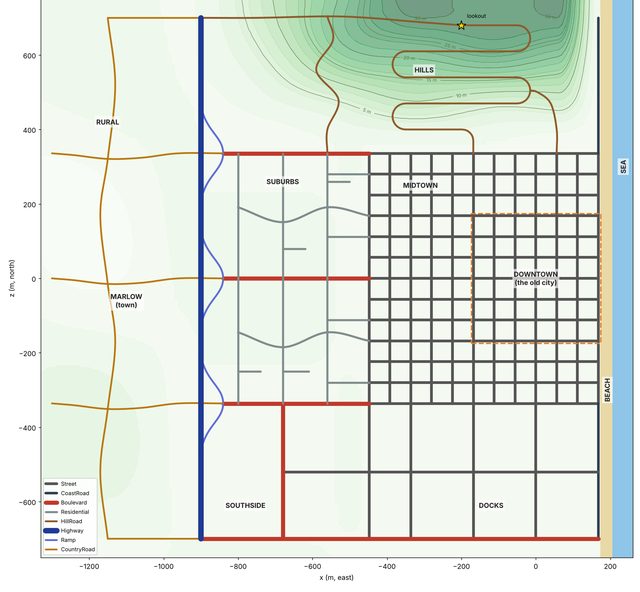
The world starts as a plan, not a model. The road network is laid out in code: a downtown grid, a raised freeway, boulevards, winding hill roads and the coast road. It produces the same 33.8 km of road every time, so the city can be rebuilt from scratch at any point and checked by tests.
-
 2
Build the material library
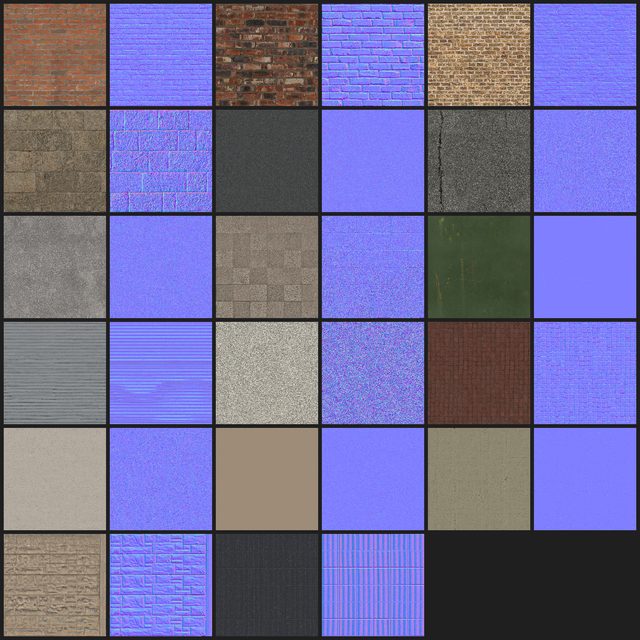
Real surfaces are prepared in Blender by script: brick, stone, concrete, plaster and paving, each with the maps that give it depth and roughness. Scripting the preparation means a new surface goes through exactly the same steps as the last one.
-
 3
Prove it on one block
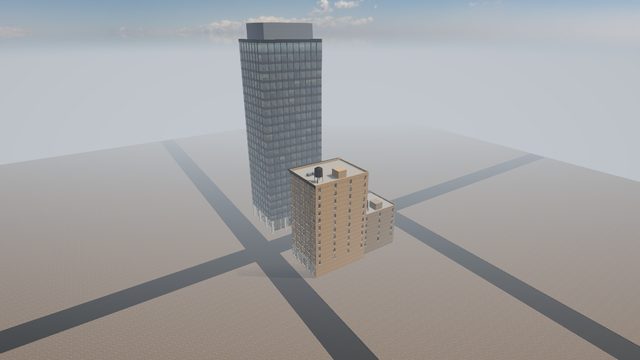
Before building all of downtown, one pilot block was built and measured on its own: how it looks up close and from a distance, and what it costs to draw. Problems are cheaper to fix on one block than on seventy.
-
 4
Light it and roll it out
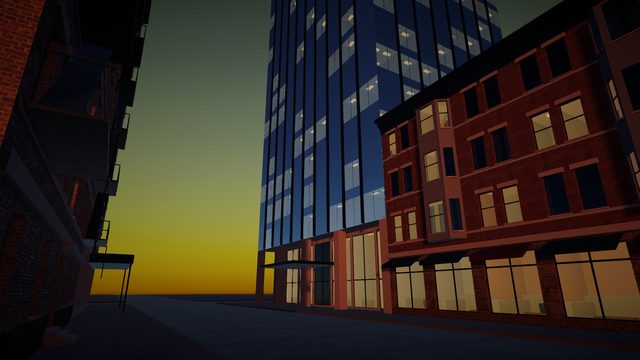
Then the look: dusk and night lighting, windows that show rooms behind the glass, shopfronts and awnings. Once the block passed, the same pipeline built the rest of downtown: 71 buildings, from shops and apartments to towers.


Interiors
Buildings you can walk into
The first fully furnished interior is a clothing store, stocked with 65 real garment models. Its windows and door show the actual street outside, so stepping in from the pavement feels continuous.


Atmosphere
Day to night
Windows aren't painted on. At night, each lit window shows a room behind the glass, so the towers read as buildings people live and work in.


Engineering
Built to be changed safely
A city this size changes every week. The project is set up so changes can be checked, not guessed at.
Unity 6 · URP · C#
Game rules live in plain C# with no engine dependencies, so they can be tested quickly and in isolation.
834 automated tests
Driving, traffic, damage, saves, the road network and the buildings are covered by tests that run on every change.
Blender by script
Materials and building assets are prepared by Python scripts in Blender, so every asset follows the same steps.
Licences tracked
Every third-party asset is logged with its author, source and licence before it goes into the game.
Credits
Third-party assets shown on this page
The clothing store uses these garment models:
- “T-Shirt On Hanger” by feisalkassim, Sketchfab, licensed CC BY 4.0. Recoloured and reduced for the game.
- “Hangers and Pants” by dudecon, Sketchfab, licensed CC BY 4.0. Recoloured and reduced for the game.
- “vest” by local.yany, Sketchfab, licensed CC BY 4.0. Recoloured and reduced for the game.
- “T-shirts homme” by newmag2207, Sketchfab, licensed CC BY 4.0. Recoloured and reduced for the game.
- “CC0 - Shirt On Hanger” by plaggy, Sketchfab, licensed CC BY 4.0. Recoloured and reduced for the game.
Shop props and textures from Poly Haven and surfaces from ambientCG (both CC0). Characters from Mixamo. Everything else is original to the project.